
Video Management & Panopto
Panopto is the supported video recording and media management tool at Harvard. Panopto automatically processes and stores both in-person and Zoom live session course recordings, and should be used to record and store any other video and audio files that are intended to be shared on Canvas sites.
Any videos on Canvas must be provided via Panopto for accessibility, user experience, and security reasons.
A good place to start with the basics of using Panopto to record or share video is the university guide: Getting Started with Panopto | HUIT
Digital Accessibility
Videos shared with students must comply with digital accessibility requirements. Panopto videos automatically generate machine captions and the UI is accessible.
For videos that are required course content and/or will be used long-term as course content, they must have professional captioning. This can be requested through the school. Please review the guide in which you can find the form to submit a request for captioning:
Storing Videos & Course Content Retention Policy
Videos that you intend to use in more than one course should be stored outside of the course folder structure. Specifically, the video should be stored separately if the video is:
- To be used in more than one course at the same time (for example, two sections of the same course in the same semester).
- To be used in future iterations of the same course.
There are two reasons for this. First, the video is easier to manage for multiple courses if it is not located in a particular course folder. Second, storing the video separately prevents its automatic archiving two years after creation, and deletion after four years. Please see the Panopto Course Content Retention Policy | Harvard IT for more detail on the retention policy.
In order to set up a protected folder for videos to be used over time or in multiple courses, please contact us for the setup and further training on managing those videos.
Must Knows
- All in-person and Zoom recordings are viewable by students by default
- All recordings of in-person sessions, and Zoom recordings of sessions scheduled within Canvas, are processed and published in the course Panopto folder. These videos are viewable by all students immediately.
- Don't change the permissions in the base Panopto folder for the course! Please read on for how to create and manage Panopto folders.
- Name your videos correctly.
- Course session names should follow this convention: [Course Number]_[Term/Year] - Title. For example, "S040_F25 - Course Preview".
- Keep the videos for a course in the correct folder.
- Course sessions should exist in that course's folder (or a subfolder). In other words, they should not exist in a previous year's folder, an individual person's My Folder, or a different course's folder.
Additional Guides
- Getting started with Panopto - IT Help (service-now.com)
- This includes a comprehensive set of links to other how-tos for Panopto.
- How to Allow Viewers to Record Videos Using Assignment Folders (panopto.com)
- Create a Panopto video assignment in Canvas as an instructor - IT Help (service-now.com)
- Submit a Panopto video to Canvas as a student - IT Help (service-now.com)
- How do I add or edit details in an assignment? - Instructure Community (canvaslms.com)
- How do I create a discussion as an instructor? - Instructure Community (canvaslms.com)
- How to Create a New Folder (panopto.com)
FAQ
How do I enable Third-Party Cookies?
Google Chrome
- Click the three-dot menu (⋮) in the upper-right and select Settings.
- Go to Privacy and security on the left.
- Click Third-party cookies (or, in some versions, Cookies and other site data).
- Select Allow third-party cookies.
Mozilla Firefox
- Click the menu button (☰) and select Settings.
- Click Privacy & Security on the left.
- Under Enhanced Tracking Protection, select Custom.
- Make sure the Cookies box is not checked (or set it to block only "Cross-site tracking cookies").
- For broadest compatibility, use Standard protection which allows most third-party cookies.
Microsoft Edge
- Click the three-dot menu (⋮) and select Settings.
- Go to Cookies and site permissions on the sidebar.
- Click Manage and delete cookies and site data.
- Ensure Block third-party cookies is turned off.
Safari (Mac)
- Open Safari. Go to Safari > Settings (or Preferences).
- Select the Privacy tab.
- Make sure Block all cookies is NOT checked.
- Also, for best compatibility, uncheck Prevent cross-site tracking (this is what blocks most third-party cookies).
- Note: In newer Safari versions, cross-site tracking/third-party cookies are always disabled for privacy, and you may not be able to fully enable them.
Unfortunately, due to the Family Educational Rights and Privacy Act (FERPA) current students and alumni are unable to download or save lecture videos.
However, current students and alumni who are, or were members of a course with lecture videos, will have continued view-only access for up to 18 months after the course ends, at which point the videos are permanently removed.
The default behavior for Panopto is to have one assignments folder operating for a course at any one time. You can close an assignments folder, preventing further student submissions, and then create another one.
A workaround allowing for more than one open assignments folder to exist at the same time is to create subfolders within the base folder, each of which can have its own assignments folder.
Follow the directions to "hide videos from students using a private folder". This will leave you with a folder that does not allow any/every student to view its contents. From there, if you wish for a particular student or students to have viewing capabilities, you can add them individually as "Viewers" by email in the section labelled "Add people and groups".
This may be useful in cases in which you wish to share recordings only with a subset of students (e.g. those who couldn't attend a live session).
Create a subfolder in the base course Panopto folder.
Once in the folder, click the gear icon to go to the new folder's settings.
Choose "Share" from the sidebar of options.
Under "Who can access this folder", click "Change". Do not click the first listed "Change" link under "People and Groups"

A pop-up will appear. Uncheck "Inherit members and permissions from..." and keep checked "Keep 2 members as added users".
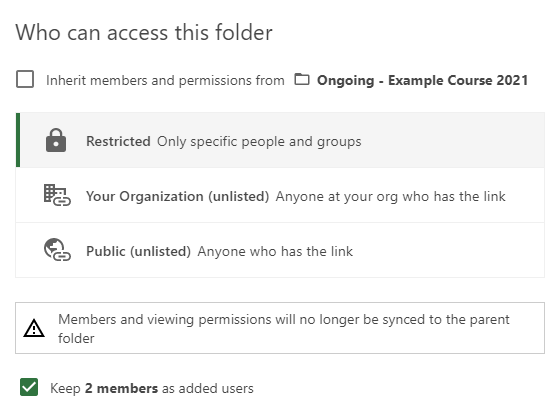
Click "Save".
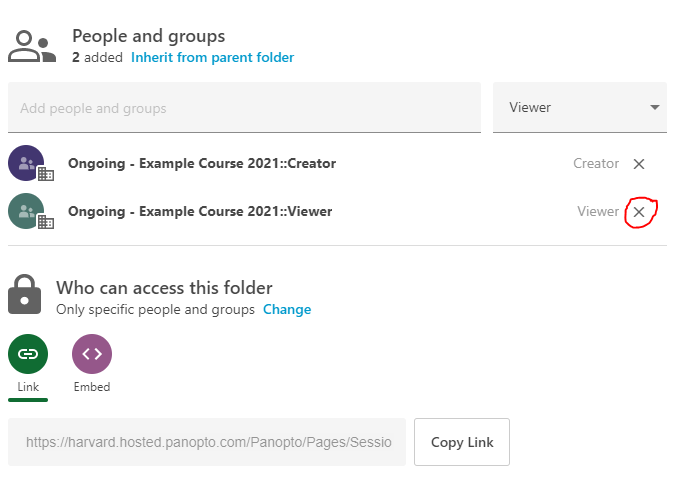
The pop-up will disappear and you will see an option to remove one of the two groups under "People and Groups" by clicking the "X" next to the name. Click the "X" next to the "Viewer" group and click "Save". This prevents students from viewing the folder.
Depending on how you wish to set up your assignment, Panopto offers several alternatives. Below you will find the instructions for most cases, depending on who should have access to each submitted video.
I want students to submit a video as an assignment and then only after it has been graded, for those videos to be shared with the whole class.
- Create a Panopto Assignments Folder for students to upload/create their video.
- Create a Canvas assignment that requires "Text Entry" submission.
- Direct students to embed the video they placed within the assignments folder within the text entry box as their assignment submission.
- After grading has been completed, open the Settings menu for the Assignments folder and navigate to the Settings tab.
- Select the checkbox next to “Allow viewers to see each other's sessions”
I want students to submit a video as an assignment and for the submission to be shared with the whole class on submission (but only with those students who have already submitted their own work).
- Create a Panopto Assignments Folder for students to upload/create their video.
- Create a graded or ungraded Canvas discussion that disallows students from seeing other submissions until they've posted themselves. See the guide here: How can I require students to reply to a course discussion? - Instructure Community (canvaslms.com)
- Direct students to embed their video within a discussion post.
I want students to submit a video as an assignment but the video will not be shared with the rest of the class.
- Create a Panopto Assignments Folder for students to upload/create their video.
- Create a Canvas assignment that requires "Text Entry" submission.
- Direct students to embed their video -- wherever originally located -- within the text entry box as their assignment submission.
I want students to submit a video for the whole class to be able to watch as soon as they submit, but not as part of a discussion thread.
- Create a Panopto Assignments Folder for students to upload/create their video.
- Open the Settings menu for the Assignments folder and navigate to the Settings tab.
- Select the checkbox next to "Allow viewers to see each other's sessions."
Depending on how you have set up your course, you have several options to share videos with students.
Embedding Panopto media into Canvas pages (recommended)
To embed a Panopto video, follow the instructions in this link: How to embed a Panopto video in a Canvas course?
Additionally, you may want to hide the Panopto link from the left-hand navigation menu so that students can only see the videos that are embedded in your Canvas page. To hide the link, follow the instructions on this page: (instructions)
Advantages:
- Permission and availability are automatically and intelligently figured out - if someone has access to the page in Canvas, they can view the video, regardless of where it is stored or what is set on the session for availability and permission.
- Panopto media embedded into Canvas pages allow for smoother and more fine-grained integration of that media within the course structure. For example, live sessions could be embedded in a live sessions page and asynchronous lecture materials can be placed within and around other asynchronous content.
Using Panopto’s folders to manage access
If you are using Panopto for video assignments, or if you want your students to have access to the Panopto folder, you will need to understand how permissions and availability works within Panopto. You will also need to manage your folders carefully.
Each Canvas site has a base Panopto folder named after the course site.
Caution: Do not change the permissions in the base Panopto folder!
The members of a Canvas site are divided into two groups that have differing permissions with respect to that folder:
- Enrollees/Students, Guests, and Observers are assigned to a Viewers group;
- Instructors, Faculty Assistants, TA/TFs, and Course Support Staff are assigned to a Creators group.
There are two criteria that Panopto looks at to determine whether someone can view a video (in Panopto, videos are called "sessions"):
- Permission: Does the user have permission to view that session?
- Availability: Is the session set to be available to view?
Permissions and availability can be determined by individual session, or by the folder in which the session exists, if applicable.
Recordings of Zoom class sessions (scheduled via the Zoom tab on the Canvas site) will be processed by Panopto and are placed into the base course Panopto folder; recordings of in-person classroom sessions are placed in a subfolder that has availability "never".
The base Panopto folder can contain subfolders. These subfolders can be created by anyone with Creator status. Folders can be set to have certain permissions and availability settings as default.
A group/person can have permission to view a folder and its contents, but sessions within that folder may be "available"/not available (determining if it can be viewed or not). Availability, as well as permissions, can be set at the folder level or for each individual video.
You should use the availability setting over permission settings whenever possible.
If you wish to prevent people viewing (some) sessions in the base Panopto folder set the "Availability" setting on the base folder to "Never (unless set on session)" and then do one of two things.
- As suggested by the prompt, edit each particular session you wish to be made viewable by changing its availability status to "now".
- Create subfolders within the base folder that have an "Availability" setting of "Immediately" and move videos from the base folder into that subfolder to make them available to view.